
Vinzo: Food Cost and Margin Control for Hospitality Venues
Supplier invoices go in, margins come out. Several AI models read each invoice, the ingredient price book updates itself, every dish is re-costed against its recipe, and the operator gets a daily briefing on what moved and where the money is.
Table of Contents
Summary
A venue's gross profit changes every time a supplier invoice lands, but nobody recalculates 50 recipes by hand. Vinzo closes that loop automatically: invoice in, prices updated, recipes costed, menu GP recalculated, briefing and savings out.
Invoices read by AI
Photograph it, upload it or forward it to the venue's own inbox address - several AI models read it and flag only what they disagree on.
Dish-level gross profit
Each dish shows selling price, price net of VAT, ingredient cost, GP against target - and a Green, Amber or Red status.
A price book that lives
Current price, 90-day average, change against the last purchase and against that average, for every ingredient bought.
Multi-venue with roles
One organisation, many venues, and a View/Create/Edit/Approve permission matrix per module and per role.
The Challenge
"The supplier raised the price of three ingredients this week. Which dishes just stopped making money?"
Context
A venue's food cost is recalculated, in practice, once or twice a year - a spreadsheet exercise someone does with last season's invoices. In between, suppliers change prices continuously, pack sizes change, the same ingredient arrives under three different names, and the recipe costs in the spreadsheet quietly stop matching reality.
The Problem
- Invoices stay on paper: a folder of supplier invoices nobody types in, so the prices used for costing are the prices from months ago.
- Margin is a guess: the chef knows which dishes sell, not which ones earn - and the two lists are rarely the same one.
- Nothing is comparable: one supplier quotes per kilo, another per pack of six, a third per case - without normalised units a price rise is invisible.
The Goal
One platform where an invoice becomes updated ingredient prices without anyone typing, every dish carries a live gross profit against its target, and the operator is told each morning which prices moved, which margins moved with them and where the next saving is.
The Solution: A Loop That Runs Itself
We built a single web platform around one loop that runs by itself: invoice in, products and prices updated, recipes costed, menu GP calculated, briefing and savings out.
Four Ways to Get an Invoice In
The friction in food costing is data entry, so capture has four doors. Upload a PDF, JPG, PNG or HEIC; photograph the invoice on a phone at the delivery door; drop a multi-page scan and say whether it is one invoice across pages or one invoice per file; or simply forward the supplier's email to the venue's own inbox address, which can be rotated at any time if it leaks. Whichever door it comes through, the invoice lands in the same review queue with the name of whoever sent it attached.
Several AI Readers, and They Have to Agree
One model reading a crumpled delivery note is a guess; several models reading it and being compared is a confidence score. Where the readers disagree on a value, the field is flagged for a human with the alternatives offered - pick one or type it. On top of that, every line is checked arithmetically (quantity × unit price against the line total) and the lines are reconciled against the invoice's own net, with the difference shown. The document sits side by side with the extracted fields, zoomable and rotatable, and approval is recorded with who approved it and when.
The Price Book Maintains Itself
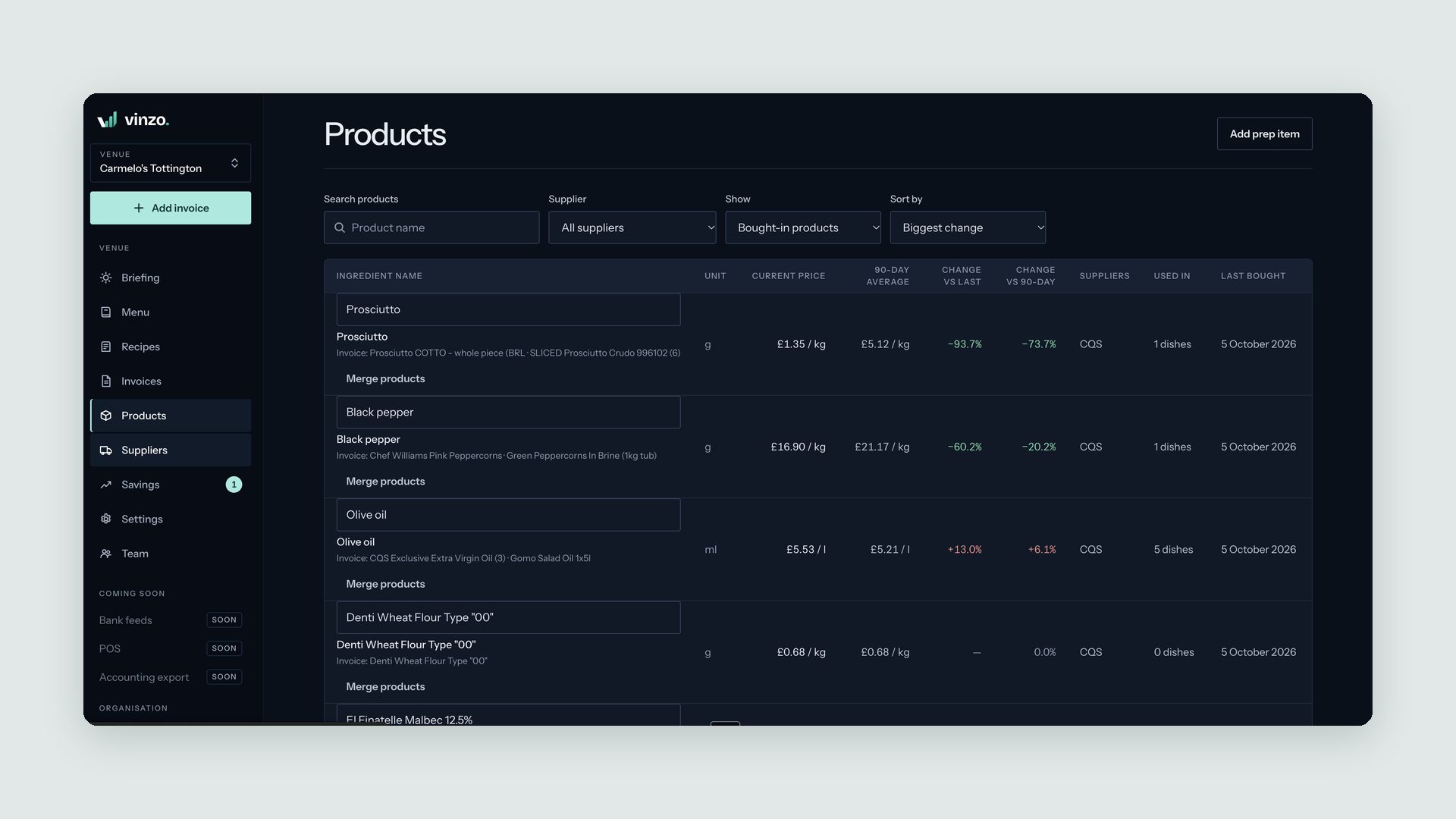
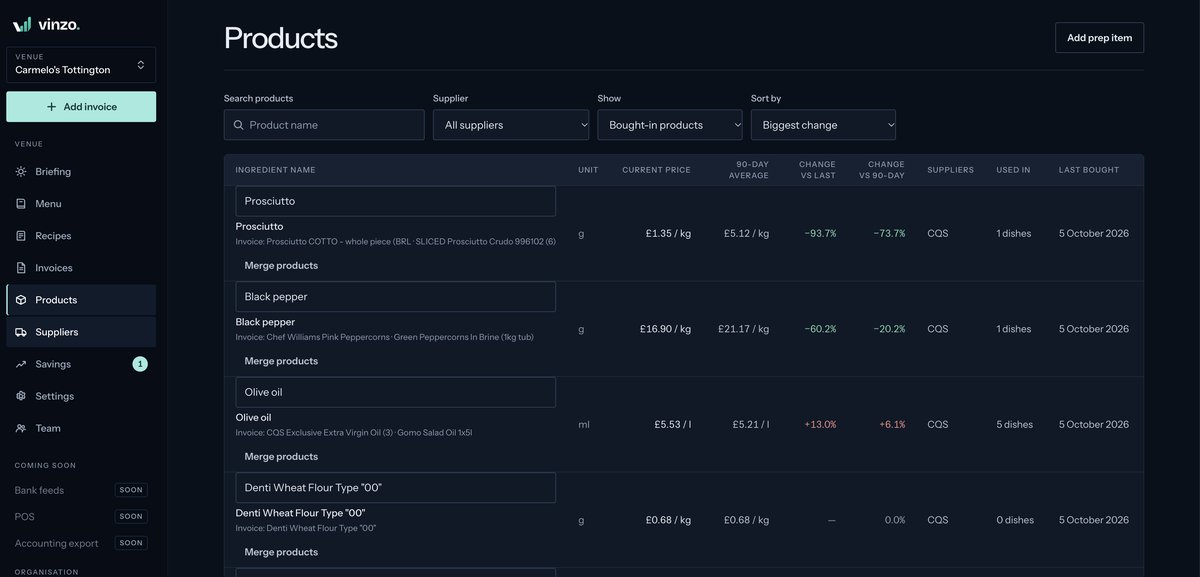
Every approved invoice line becomes a price in the ingredient price book. Each product carries its unit, its current price, its 90-day average, the change against the last purchase and against that average, which suppliers sell it, how many dishes use it and when it was last bought - sortable by biggest change, so the week's movers come to the top. The raw invoice text each product came from stays visible, and because suppliers name the same thing three ways, duplicate SKUs can be merged into one ingredient.
Recipes, Including the Ones Inside Recipes
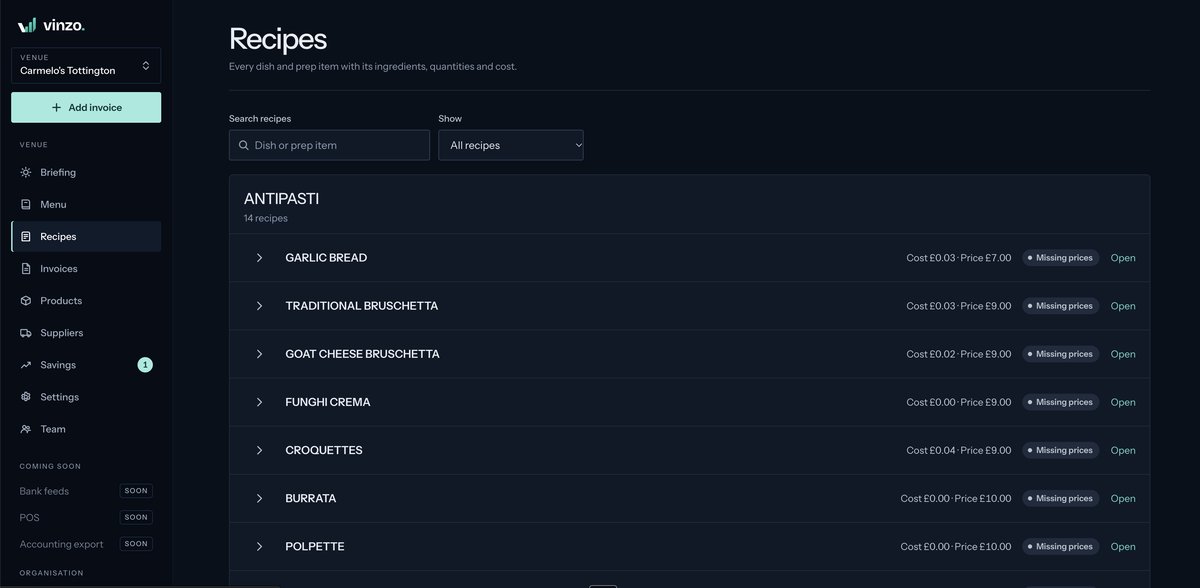
A kitchen does not only cost finished dishes. Béchamel, pizza dough and stock are prep items - sub-recipes with their own batch cost and yield, which produce a cost per kilo or per litre that then flows into every dish using them. Dishes and prep items sit together grouped by menu section, each card showing cost against price and an honest status when something is missing: no recipe yet, or a recipe whose ingredients are not all priced.
The Menu, Scored Green, Amber or Red
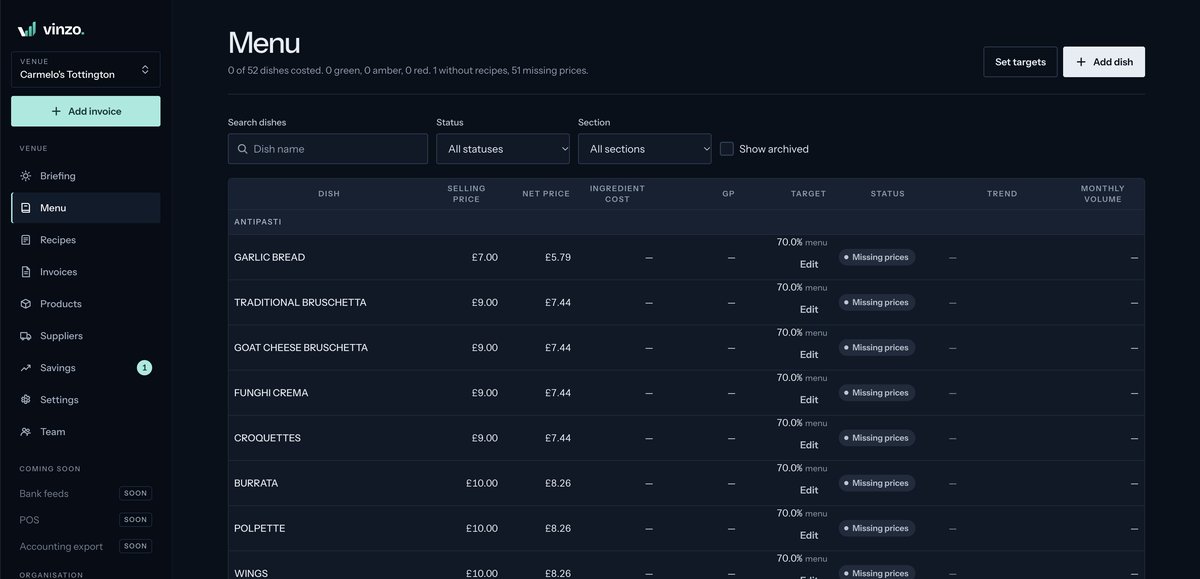
The menu is the answer screen. Each dish shows its selling price, the price net of VAT at the venue's own rate, the ingredient cost from the live price book, the resulting gross profit, the target it is measured against, a Green/Amber/Red status, a trend and its monthly volume. It filters by status, by menu section and by what is missing, so the list of dishes below target is one click away - and targets themselves can be set in bulk rather than dish by dish.
Opening a Dish: Where the Cost Actually Is
A dish's own page breaks the number apart. KPI tiles for selling price, net price, ingredient cost, GP and target - with the target naming its own source. Then the recipe table sorted by line cost, each ingredient with its quantity, unit, unit price, line cost and share of the dish's cost, so the two lines that are 70% of the plate are at the top. Units cover grams, kilos, millilitres, litres, each, and the pour sizes a bar actually uses. A cost history chart adds a point at every price change, next to a plain-language account of what changed and advice on what to do about it. A sales estimate turns that per-plate margin into money per month.
Want a web platform like Vinzo?
Reply within 48h. No strings attached.
A Briefing Instead of a Dashboard Habit
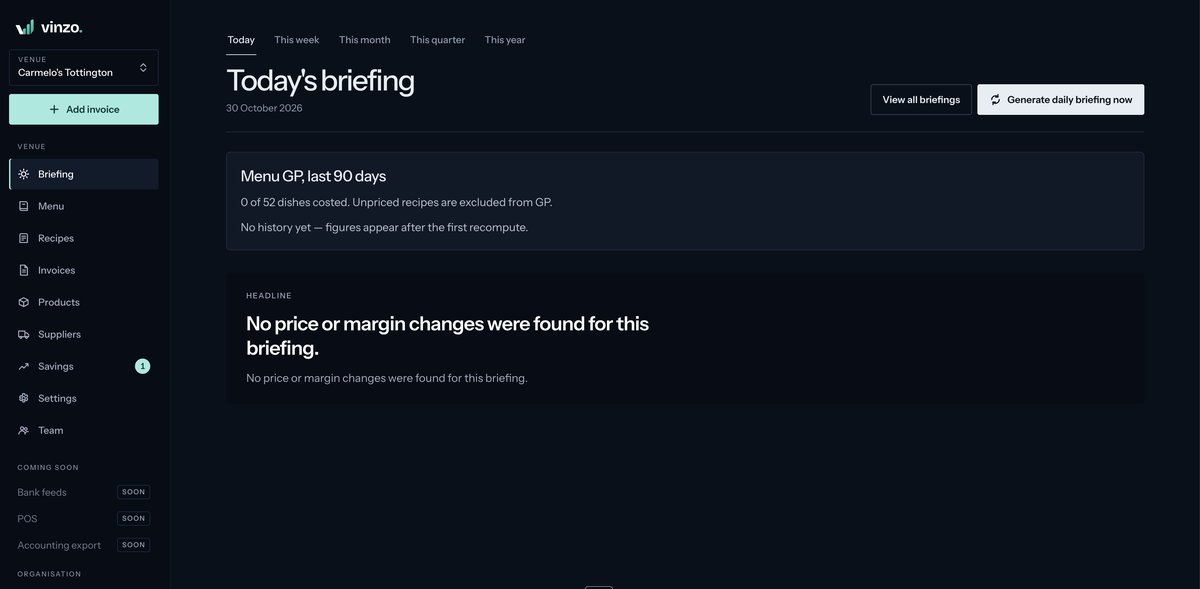
Nobody opens a reporting tool every morning, so the platform comes to them. At the briefing time the venue sets, Vinzo generates a summary of the price and margin changes since the last one - and only those above the venue's own alert threshold, because a 0.4% move on flour is noise. A headline card states the day in one sentence, period tabs widen it to the week, month, quarter or year, menu GP over the last 90 days sits alongside with how much of the menu is actually costed, and a briefing can be generated on demand when someone wants it now.
Which Supplier Is Actually Stable
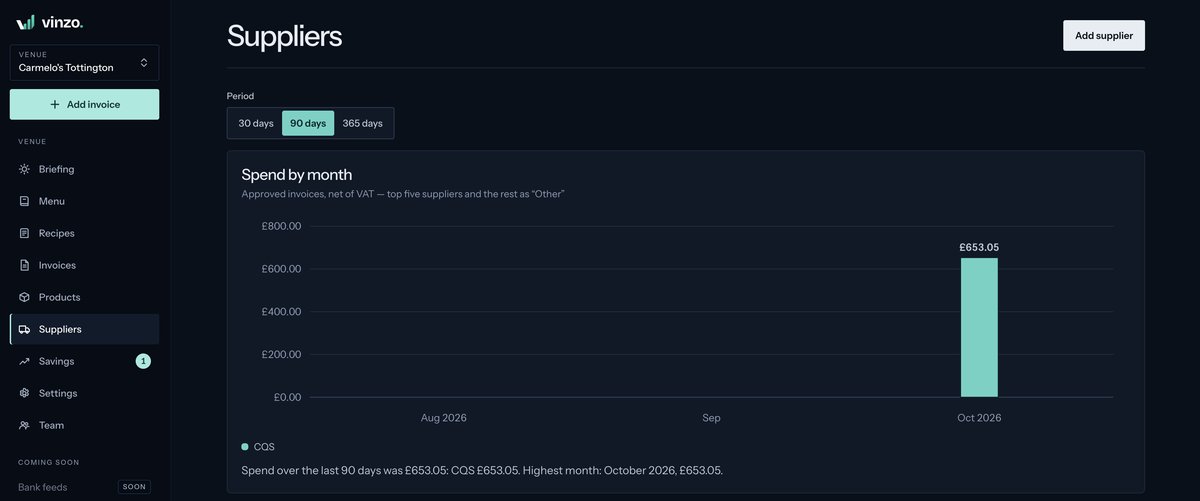
Approved invoices add up into supplier analytics over 30, 90 or 365 days. A stacked spend-by-month chart shows the top suppliers with the rest collected as Other, net of VAT, with a written summary beside it. Per supplier: total spend, invoice count, how many products, how many price rises - and a stability score built from how many of their products changed price, the average size of the largest move, and the balance of rises against falls. That is the difference between the cheapest supplier and the one you can build a menu price on.
Savings, Ranked by What They Are Worth
Analysis that does not end in an action is a report. The savings module turns what the invoices reveal into suggestions ranked biggest first, each with a monthly value, so the first one on the list is the one worth doing this week. Available savings per month sit next to what has actually been achieved this month and this year, suggestions move through Open, Done and Dismissed, a minimum-value filter hides the ones not worth a conversation, and a sidebar badge counts what is still open so the list is not forgotten.
The Eight Steps from Nothing to a Costed Menu
Food costing software usually dies at setup, so onboarding is a product in itself: venue details, a bulk import of historic invoices, the menu, a product review, recipes, sales estimates, the target gross profit, and then the step that does the work. Vinzo links recipe ingredients to invoice products automatically wherever the name is unambiguous and the units are compatible, and leaves everything ambiguous or unmatched visible for a human to resolve instead of guessing silently. Then it costs the menu and prepares the first briefing.
One Organisation, Many Venues, Different Trust
A group does not give the kitchen porter the billing screen. Built-in Owner, Manager, Staff and Read-only roles can be extended with custom ones, and the permission matrix sets View, Create, Edit and Approve independently for each module. One rule makes it genuinely useful: without View, a person only sees the invoices they added themselves - which is exactly how you let staff photograph deliveries without opening the venue's supplier terms to them. Each venue then has its own country, currency, VAT rate on menu prices, cuisine, alert threshold, default target GP and briefing time, with a venue switcher across the top.
Features Delivered
Multi-Model Invoice Reading
Several AI readers extract each invoice and are compared against each other; only the values they disagree on are flagged for a human.
Four Capture Channels
File upload, phone photo, multi-page scan splitting, and a rotatable per-venue email address suppliers can be forwarded to.
Line Validation & Reconciliation
Quantity × unit price checked against each line total, and the lines reconciled against the invoice net with the difference shown.
Live Ingredient Price Book
Current price, 90-day average, change against last purchase and average, suppliers, usage count and last-bought date per product.
Normalised Units & Product Merging
Pack sizes reduced to a price per gram, millilitre or each, and duplicate supplier SKUs merged into a single ingredient.
Recipes with Prep Items
Sub-recipes carry their own batch cost and yield, producing a cost per kilo or litre that flows into every dish that uses them.
Dish-Level Gross Profit
Selling price, price net of VAT, ingredient cost, GP against target, status, trend and monthly volume for every dish on the menu.
Cost History & Price Advice
A point on the chart at every price change, with a plain-language account of what changed and a recommendation on what to do.
Scheduled Daily Briefing
Generated at the venue's own briefing time, filtered by its alert threshold, with period tabs and generation on demand.
Supplier Spend & Stability
Spend by month across the top suppliers, plus a stability score from how many products moved, by how much, and in which direction.
Ranked Savings Suggestions
Suggestions found in the invoices, biggest monthly value first, tracked through Open, Done and Dismissed against what has been achieved.
8-Step Onboarding Wizard
From historic invoices to a costed menu, ending with automatic ingredient-to-product linking and every ambiguity left visible.
Roles & Permission Matrix
Owner, Manager, Staff and Read-only plus custom roles, with View, Create, Edit and Approve set independently per module.
Multi-Venue, Multi-Currency
One organisation over many venues, each with its own country, currency, VAT rate, cuisine, targets and briefing time.
Results
An invoice becomes a margin, not a filing job
Photograph or forward the invoice and the prices, the recipe costs and the menu's gross profit update themselves - no spreadsheet, no re-typing, no month-end exercise.
The question changes from “what sells” to “what earns”
Every dish has a gross profit against its target and a Green, Amber or Red status, with each recipe's cost broken down by share - so a menu decision rests on the two ingredients that actually drive the plate.
Price moves are caught the morning they happen
A daily briefing filtered by the venue's own alert threshold, supplier stability scores and a savings list ranked by monthly value - so the next action is named, not merely reported.
Technical Spotlight
// Architecture
Organisation over many venues, every figure derived from approved invoice lines
// AI
Several document models read each invoice and are cross-compared; disagreement becomes a confidence flag for a human
// Capture
PDF, JPG, PNG and HEIC upload, mobile photo, multi-page splitting, and a rotatable inbound email address per venue
// Costing engine
Unit normalisation across pack sizes, nested prep-item sub-recipes with batch cost and yield, VAT removed per venue rate
// Analytics
90-day rolling price averages, cost history per ingredient, supplier stability scoring and spend attribution by month
// Access control
Built-in and custom roles with View/Create/Edit/Approve per module, and a without-View rule scoping people to their own uploads
// Platform
Responsive web app with light and dark themes, 30+ country and multi-currency support, and a venue switcher throughout
// Next
Bank feeds, POS integration and accounting export, so sales volumes and payments arrive without being typed
Want a web platform like Vinzo?
Reply within 48h. No strings attached.
Services used in this project
The services behind this build. See what each one covers and how it would apply to your case.
Sector
HoReCa & restaurants