
PlayPass.ro: Bookings, Access and Payments for Sports Facilities
An operator dashboard that runs the whole arena - courts, bookings, subscriptions, payments, even the floodlights and the gate - and a mobile app where players find a venue, pick a slot and pay. Two apps, one database - and an AI assistant on every operator screen.
Table of Contents
Summary
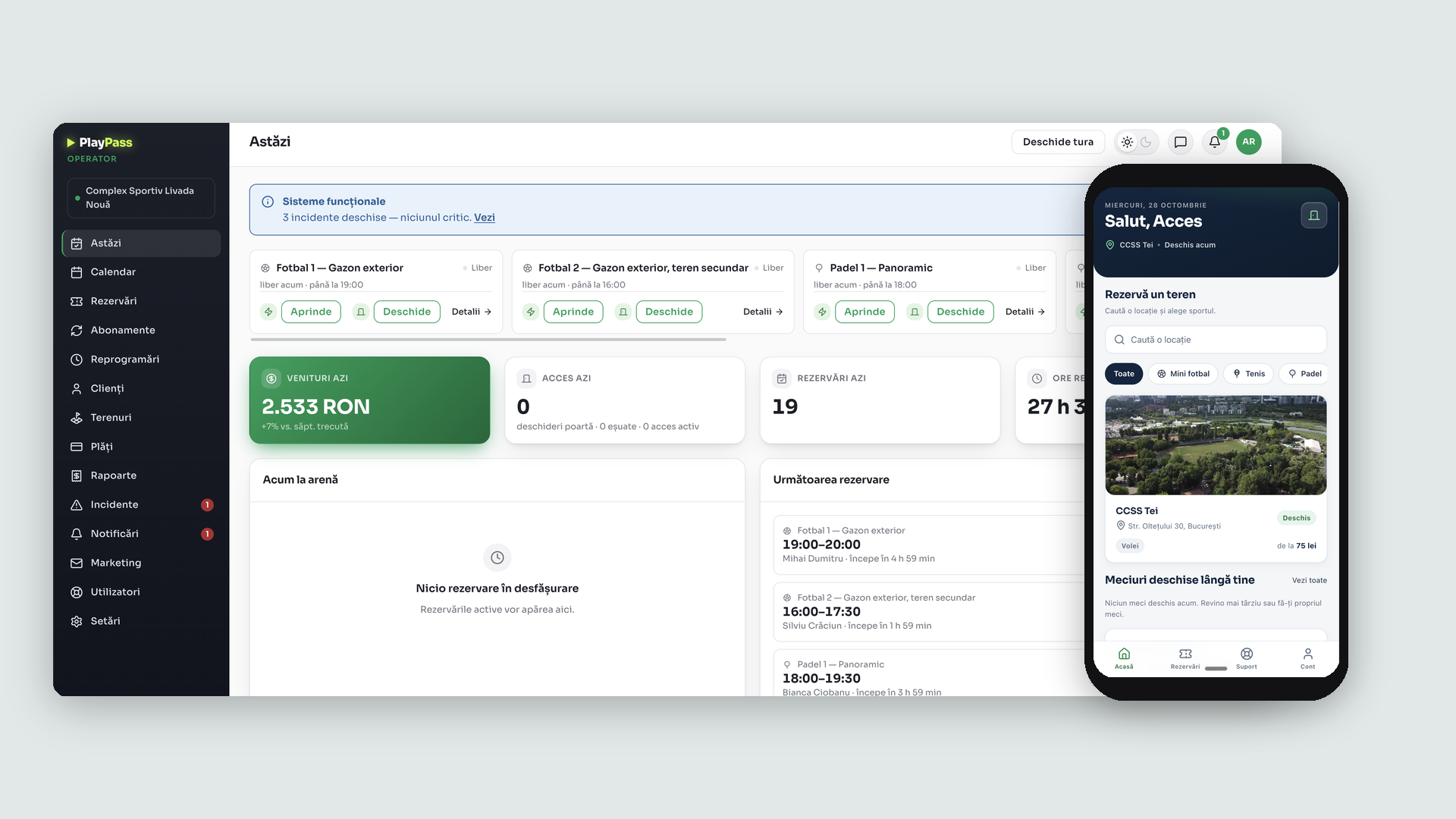
From the notebook at the reception and the physical key on the gate to one platform: the operator runs every court from a single dashboard, players book and pay by themselves, and the access to the court follows the booking.
2 apps, 1 database
The operator dashboard and the player mobile app work on the same bookings, payments and courts.
Automated court access
Floodlights and the entrance gate are commanded from the dashboard, with every gate opening counted.
Online + reception payments
Card payments from the app reconcile in the same place as the ones collected at the counter.
Subscriptions & win-back
Recurring plans with expiry and arrears, plus email campaigns built from booking activity.
The Challenge
"Bookings in a notebook, cash at the counter, a physical key for the gate - and no idea which clients stopped coming."
Context
A sports facility typically runs on phone-call bookings, cash and physical keys. The operator cannot see demand per time slot or per court, subscriptions are collected from memory, and there is no record of who actually used the courts.
The Problem
- Manual operations: every booking takes a phone call, every entry to the court takes someone with a key, every payment takes the counter.
- Invisible money: no view of revenue per court, demand per time slot, subscription arrears or how much of the income was paid in advance.
- Silent churn: a client who stops booking simply disappears - there is no list of who went quiet and no way to reach them.
The Goal
One platform where the operator runs the whole arena from a single dashboard - courts, bookings, subscriptions, payments, access and incidents - and players book and pay by themselves from a mobile app, with court access following the booking automatically.
The Solution: Two Apps, One Database
We designed and built two applications that work on the same database: a dashboard for the people who run the arena, and a mobile app for the people who play in it.
The Today Screen - Running the Shift
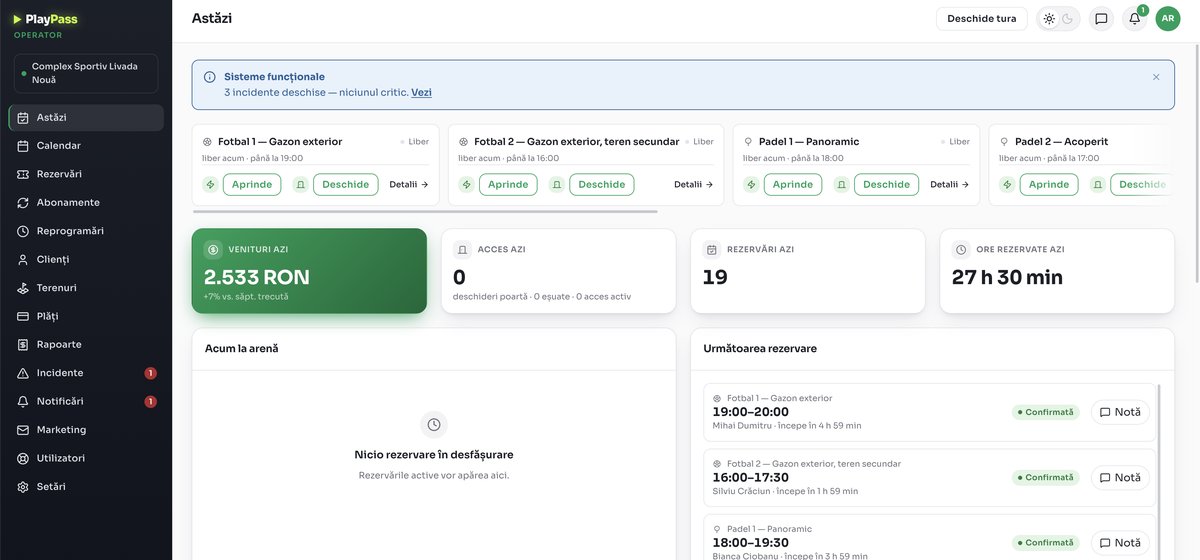
The operator opens the shift and sees the whole arena on one screen: every court with its status, buttons to turn on the floodlights and open the gate remotely, and live counters for today's revenue, gate accesses, bookings and reserved hours. A system-health banner keeps open incidents in sight, and the next reservations line up on the right with their confirmation status.
A Calendar with Four Zoom Levels
Day, week, month and year views over a court-by-hour grid, with each court coloured by its sport and the bookings generated from subscriptions labelled as such. The operator can block any interval with a reason - maintenance, private event, hardware problem, bad weather - and a blocked slot immediately stops being bookable by players, until it is unblocked from the same dialog.
Every Booking, One List, With Its Source
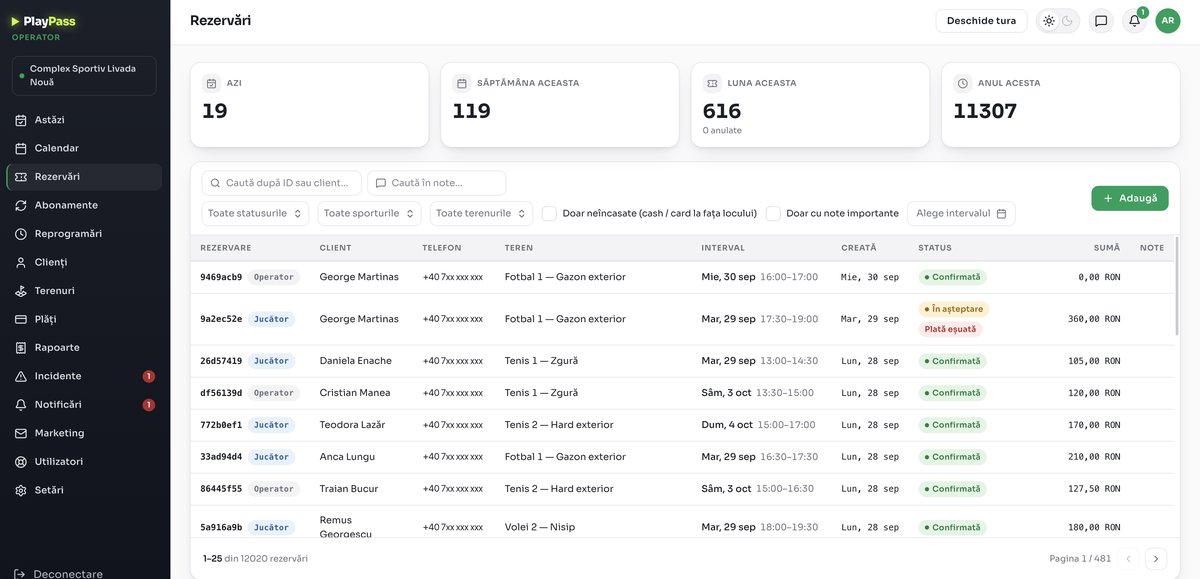
Bookings made by players from the app and bookings taken by the operator at the reception land in the same list, each marked with its source. The list is searchable by client and filterable by status, sport, court and interval, with counters for the day, the week, the month and the year - and payment problems surface directly in the status column. Each booking opens into its own page with a timeline of events, internal notes and the messages sent to the player - and the operator can create bookings for walk-ins, existing clients or new accounts, with weekly repetition, an optional organisation behind the booking and free-of-charge entries tracked separately.
Subscriptions with Visible Recurring Revenue
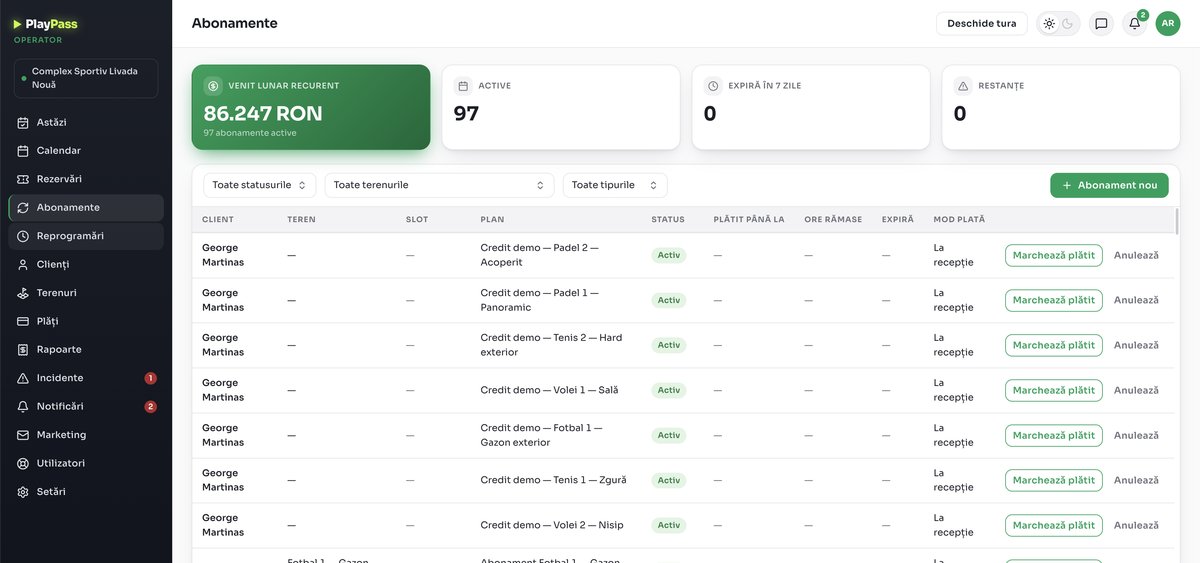
Recurring plans per client and per court, with the monthly recurring revenue, the active count, upcoming expirations and arrears each on their own card. Every subscription carries its plan, payment mode and paid-until date, and the ones collected at the reception are marked as paid with one click. Two product models are supported: a fixed weekly slot on a given court, and hour packages - a number of entries per month, each worth a set number of minutes, valid on any court of the same type and paid with credits.
Client Profiles the Reception Can Trust
Every client has a profile with a trust score, no-show and cancellation counts, verified phone and email, internal notes and the full booking history. A price category - standard, member, student or company - prepares differentiated pricing, and the list separates accounts created by players from clients added at the reception, and the active from the inactive.
Rescheduling: “I Couldn't Play” Becomes Retention
Players who missed a session send a request from the app; the operator decides and can grant rescheduling tokens - one token equals one hour of play at the court's base rate. Tokens can also be adjusted manually, and every adjustment lands in an audit log.
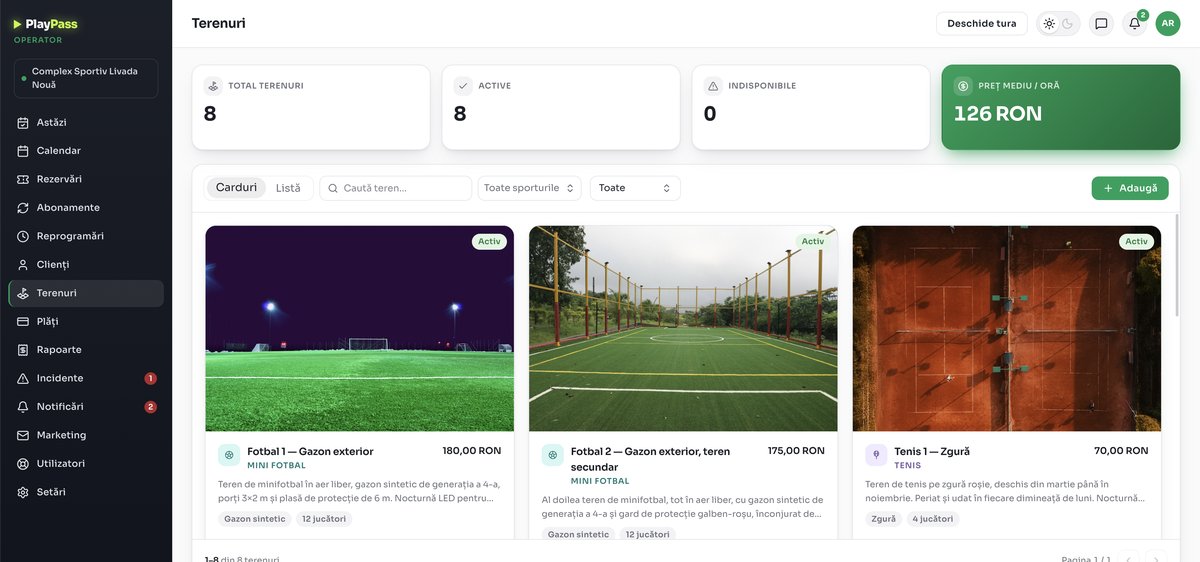
The Court Catalog
Every court is a card with its own photo, sport, surface and hourly price, switchable between card and list views and filterable by sport. The header keeps the totals in sight: how many courts exist, how many are active or unavailable, and the average price per hour across the arena.
The Pricing Engine: the Most Specific Rate Wins
Each court carries its own weekly schedule and a base price that named rates can override - every rate defined by duration, day and time interval, so peak evenings, weekends and floodlit hours are priced exactly, and the most specific rate always wins. Subscription plans - fixed slots and hour packages alike - are defined in the same place, per court, and each court's own tab tracks its revenue, bookings and occupancy rate over time.
Want a web platform like PlayPass.ro?
Reply within 48h. No strings attached.
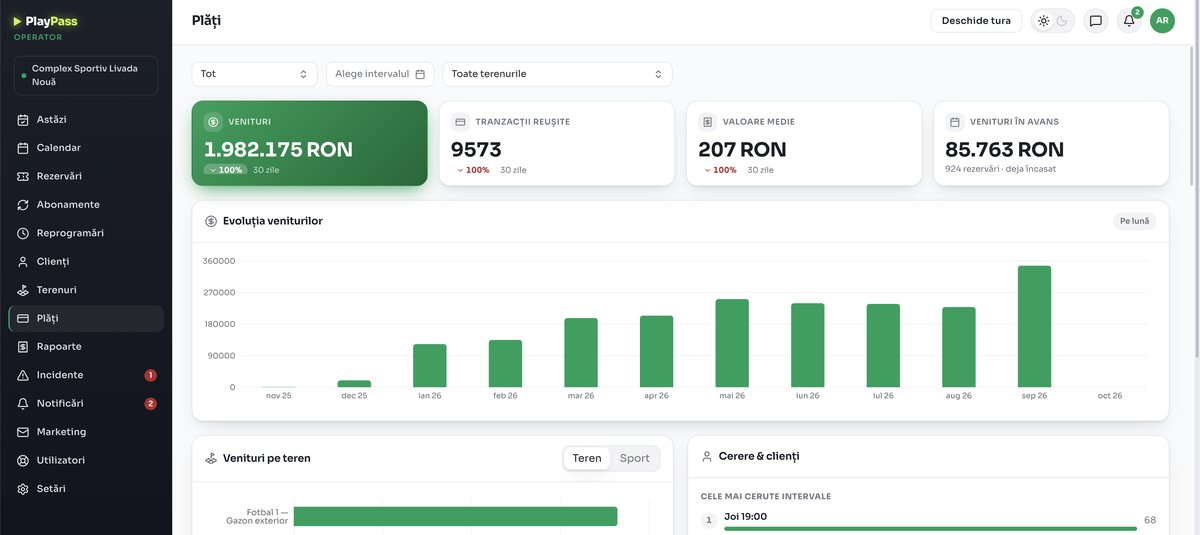
Payment Analytics the Operator Can Act On
The payments screen turns collections into decisions: revenue evolution by month, successful transactions, the average transaction value and how much of the income was paid in advance. Below, revenue breaks down per court and the most requested time slots rank themselves - so prices and schedules follow the demand instead of guesswork. A needs-attention panel keeps the failed-payment rate, refunds in progress and the breakdown of failure reasons in sight, and the full transaction table - with method, receipt and invoice per row - exports to CSV.
Reports and Cash-Register Shifts
Two reports close the money loop, both printable and exportable to CSV: a bookings report with the collected amounts broken down by cash, POS and online - free-of-charge entries and organisations included - and a per-source revenue report that counts revenue at the date of payment, with refunds subtracted from the month they happened in. Cash-register shifts tie it all to the counter: opening balance, cash and card collected, the counted amount and the difference, shift by shift - opened straight from the Today screen's permanent button.
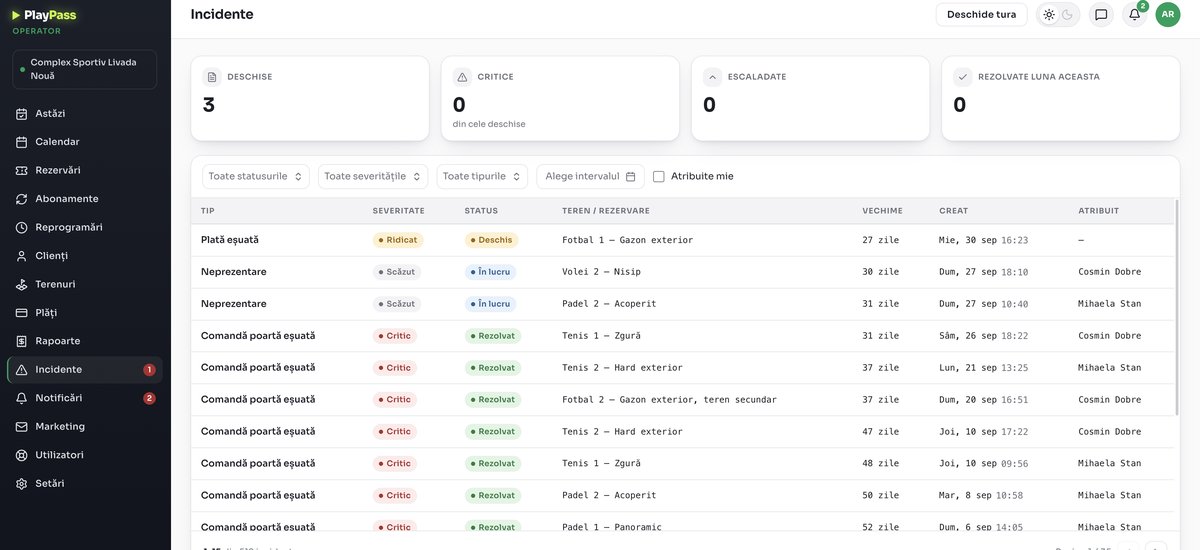
Incidents - Nothing Fails Silently
Failed payments, failed gate commands, no-shows - every problem becomes an incident with a type, a severity, a status and a person assigned to it. The counters separate what is open, critical, escalated and resolved this month, so a gate that refused to open at 9 PM is a tracked item the next morning, not a forgotten complaint.
Notifications and Operating Rules
The operator's inbox groups events by category - access and hardware, payments, bookings, clients, subscriptions - and a personal matrix decides, per event, whether it arrives in the app, as a push or by email, with pushes paused overnight. Alerts escalate to the manager after 15 minutes without a response, and the venue's rules - the cancellation window, the slot hold during payment, the allowed durations, the minimum notice and how far ahead players can book - are all settings, not conventions. Where the venue also sells through Playtomic, a reminder prompts the operator to block the interval there too.
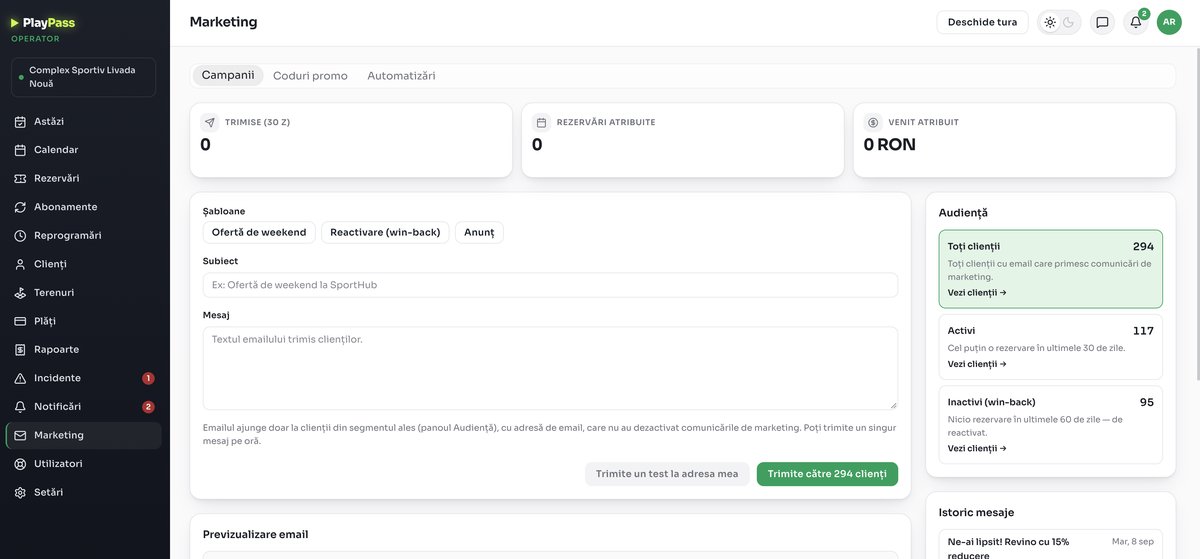
Marketing Built on Booking Activity
Email campaigns with ready-made templates - a weekend offer, a win-back message, an announcement - sent to audience segments the platform maintains by itself: all clients with marketing consent, the active ones who booked in the last 30 days, and the inactive ones with no booking in over 60 days. A test send goes to the operator first, and every campaign reports its own return: recipients, bookings generated and revenue attributed. Automations run by themselves - booking reminders by email and SMS at 24 hours and 2 hours before, promo codes sent automatically for empty nearby slots, and lifecycle triggers from the first-booking thank-you to the no-show follow-up - while promo codes come in three types (percentage, fixed amount, fixed hourly price) with usage caps and their own revenue attribution.
A Team, Not Just an Owner
A permission matrix over six roles - reception, cashier, manager, full, accountant, owner - across twelve modules, with three levels per cell: access, view-only or none. Sensitive settings stay editable only by the owner, a custom profile picks modules per person, and the shift schedule routes alerts to whoever has the cash register open - or to the whole team if nobody does. Two further modules, academies and competitions, ship with the platform and are activated per venue on a feature flag.
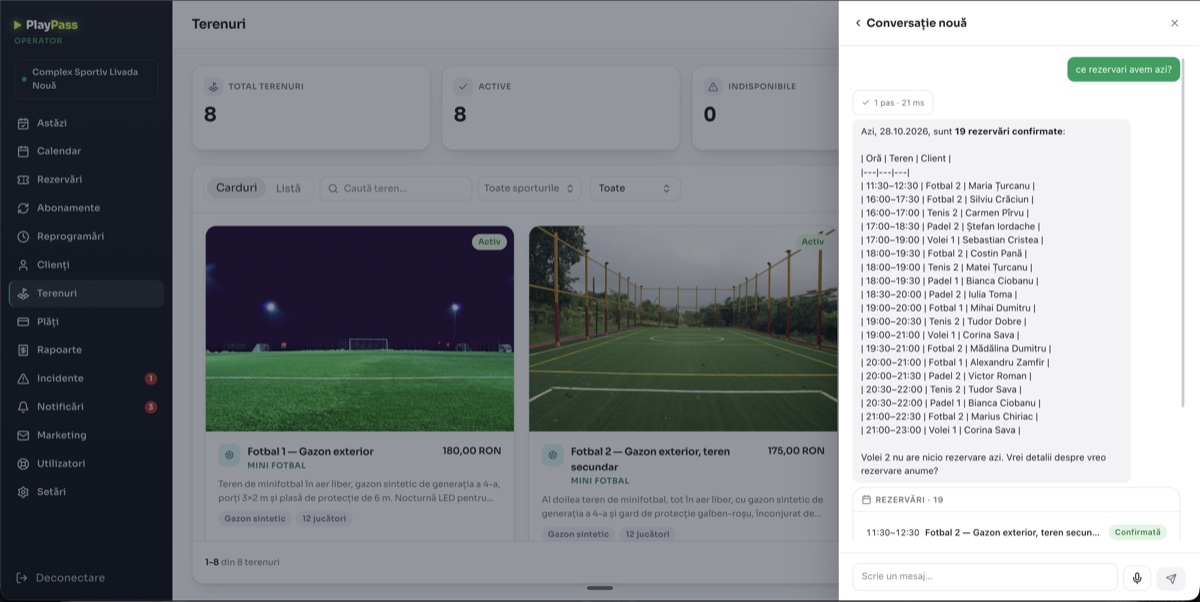
An AI Assistant on Every Screen
A side panel available anywhere in the dashboard answers in natural language from the arena's real data - bookings, free slots per court with their prices - rendered as structured cards in the conversation, with voice input and saved conversations. It proposes contextual actions, from sending offers for the free slots it just listed to blocking an interval, and every action runs only after the operator confirms it - opening the gate requires the owner's confirmation. A daily summary lands in the operator's inbox every morning.
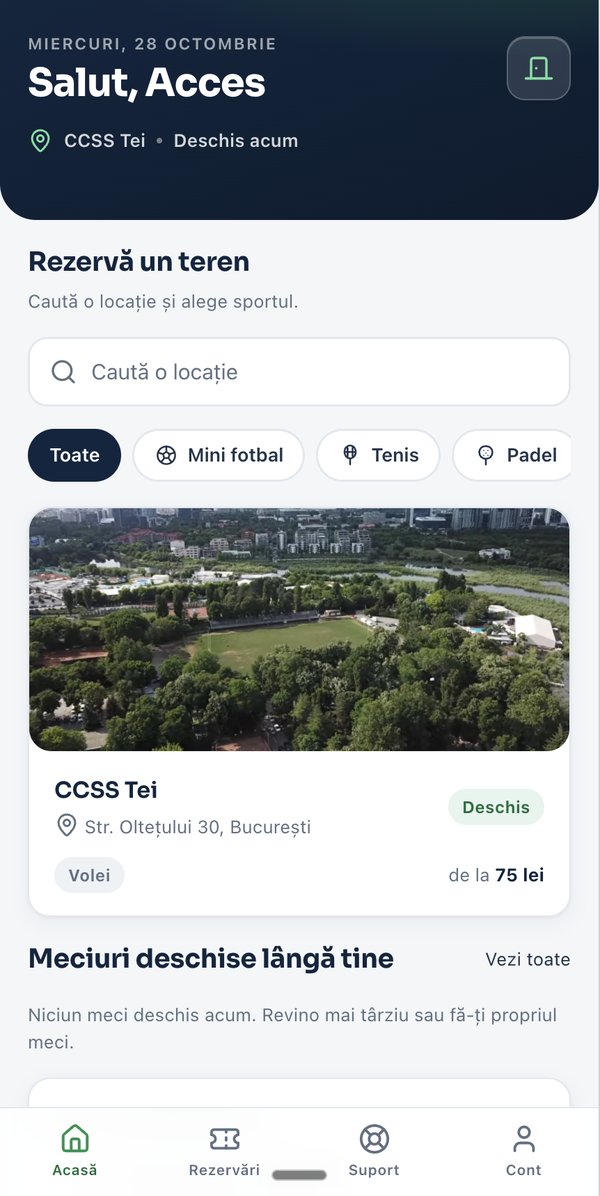
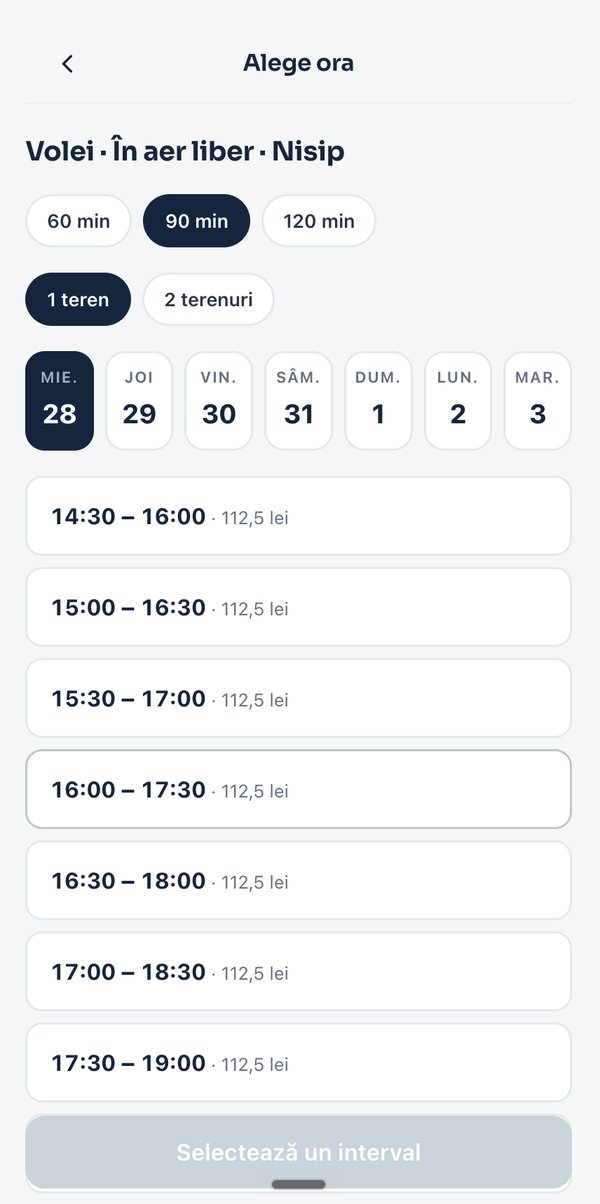
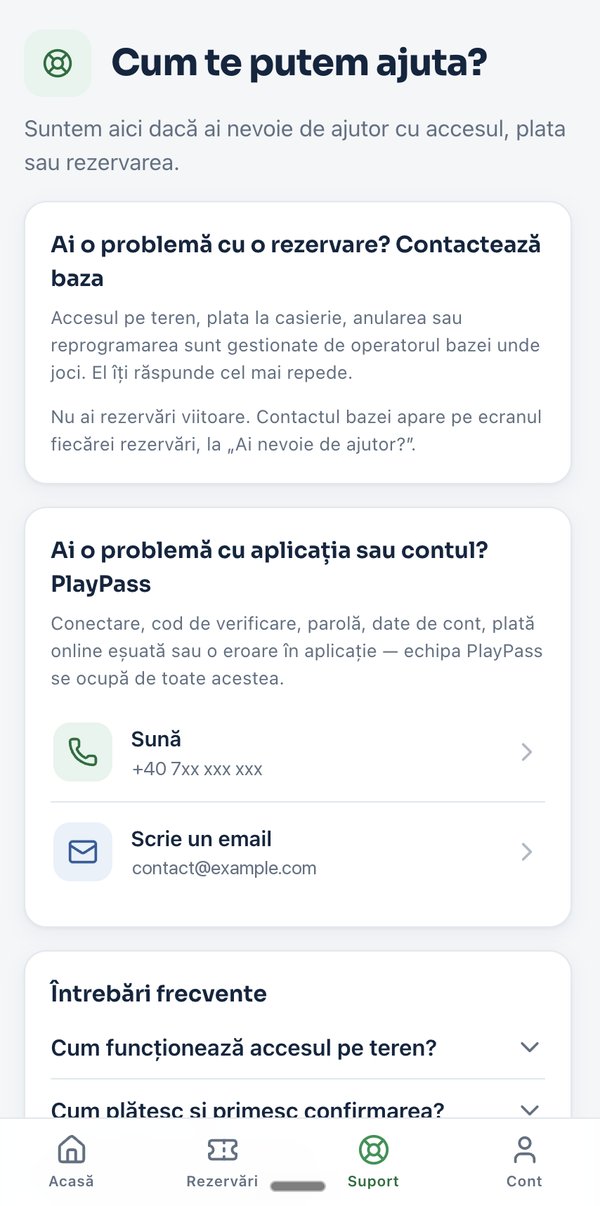
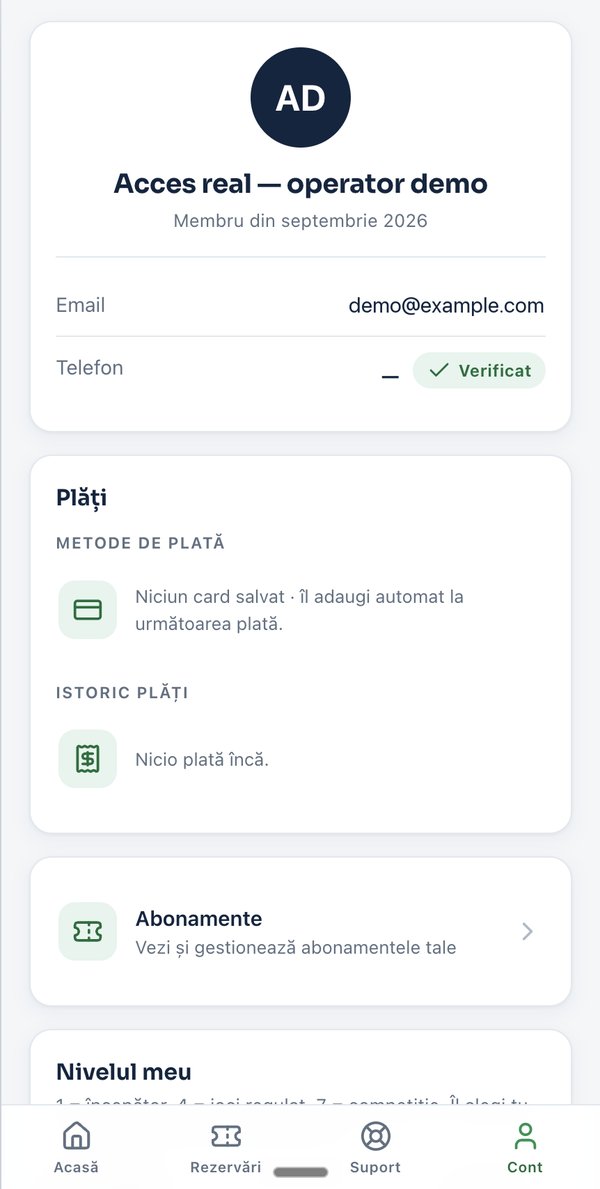
The Player Mobile App
Four tabs that cover a player's whole path to the court: Home - search venues by location and sport, with open matches nearby; booking - pick the duration (60, 90 or 120 minutes), one or two courts, the day and the interval, each with its price shown up front; Support - the venue's contact attached to every booking, plus phone, email and an FAQ; Account - saved cards and payment history, subscriptions and a self-assessed skill level from beginner to competitive.
Features Delivered
Automated Court Access
Floodlights and the entrance gate commanded from the dashboard, daily access counters, and failed gate commands tracked as incidents.
Online & Reception Payments
Card payments from the app and cash at the counter reconcile in one place, with advance revenue tracked separately.
Subscriptions
Two recurring models - fixed weekly slots and hour packages valid on any court of the same type - with expiry, arrears and payment mode tracked.
Open Matches & Skill Levels
Players see open matches near them and carry a self-assessed skill level, so strangers can fill a court at a compatible level.
Incident Management
Failed payments, gate command failures and no-shows become incidents with severity, status and a person responsible.
Email Marketing & Promo Codes
Weekend-offer and win-back templates, self-maintained audience segments, promo codes with usage caps - and bookings and revenue attributed per campaign.
AI Assistant with Confirmed Actions
Natural-language answers from the arena's data on any screen, contextual actions executed only after operator confirmation, and a daily summary.
Per-Court Pricing Engine
Weekly schedules, a base price and named rates by day, interval and duration - the most specific rate wins, floodlit hours included.
Reports & Cash Reconciliation
Bookings and per-source revenue reports with CSV export and print, plus cash-register shifts reconciled down to the counted difference.
Roles & Permissions
Six roles across twelve modules with access, view-only or none per cell - and the sensitive settings editable only by the owner.
Rescheduling Tokens
Missed-session requests from the app turn into play tokens at the court's base rate, with every adjustment recorded in an audit log.
Notification Matrix & Alerts
Per-event delivery over app, push or email with an overnight pause, plus hardware alerts that escalate to the manager after 15 minutes.
Results
Players serve themselves, end to end
Find the venue, pick the slot, pay by card, get on the court - without a phone call and without someone walking over with a key.
The operator runs the arena from one screen
Courts, gates, floodlights, bookings, subscriptions, payments and incidents - one dashboard instead of a notebook, a cash box and a keychain.
Demand and churn become visible
Revenue per court, the most requested time slots and the clients who went quiet - each a list the operator can act on, including win-back campaigns sent from the same platform.
Technical Spotlight
// Architecture
Operator platform and player app on one shared database
// Web
Operator dashboard covering bookings, subscriptions, payments, incidents and marketing
// Mobile
Player app for finding venues, booking slots, paying and getting support
// Access
Remote floodlight and gate commands, access counters, failed commands tracked as incidents
// Payments
Online card payments plus at-reception collection, subscriptions with expiry and arrears
// AI
A conversational assistant over live arena data, with tool actions gated by operator confirmation
// Platform
Installable PWA, light and dark themes, multi-location reporting and CSV exports throughout
Want a web platform like PlayPass.ro?
Reply within 48h. No strings attached.
Services used in this project
The services behind this build. See what each one covers and how it would apply to your case.
Sector
Sports & leisure